 Lead
Lead1. Start with your business and a useful brief
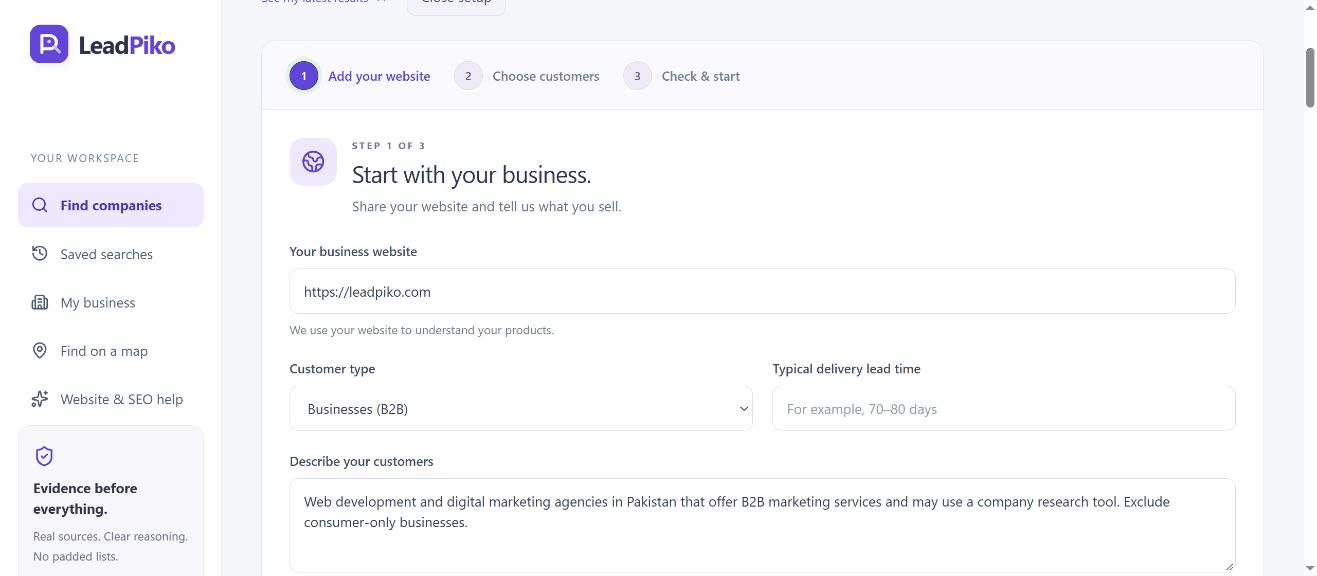
Open Find companies and enter your business website. Select your customer type and describe the companies you want to reach. The description should explain what a relevant company does, where it operates and why your offer could fit.
“Web development and digital marketing agencies in Pakistan that offer B2B marketing services and may use a company research tool. Exclude consumer-only businesses.”
This is a research brief, not a claim that those agencies want to buy. For your own business, replace the industry, country and use case. If product specifications matter, open Product fit and add them.
2. Choose countries and company criteria
Select Continue to reach Choose customers. Enter target countries separated by commas. Choose whether you need potential buyers, distributors, retailers, partners or competitors.
For the agency example, use Pakistan, potential buyers, agency roles and B2B marketing or website development as the industry. Add requirements that distinguish a useful match from an unrelated company.
The activity window sets the recency you want to investigate. A limited public footprint can leave activity unconfirmed. Start with one country and a specific brief so you can review the evidence before expanding.
3. Check your brief before starting
Select Continue again to reach Check & start. Review your website, countries, buyer roles and requirements. Use Back to correct an answer.
Choose a supported-match target per country. A first run with 25 per country keeps the shortlist manageable. This is an objective: source availability, evidence checks and the research budget can produce fewer matches.
Skip companies in my history uses saved searches in this browser workspace. Then select Find companies to start research. Hosted research continues on the server if you close the tab.
4. Review each company and its sources
When results arrive, expand a company card and follow its source links. Check that the website belongs to the right company, its services match your brief and any activity evidence supports the date and claim shown.
- Fit: does the company actually provide the services or operate in the market you selected?
- Evidence: does the linked page support the qualification, rather than merely mention a keyword?
- Contact: is the public contact information current and associated with that company?
- Gaps: what still needs a human check before outreach?
A company score helps organise research; it is not a probability of a sale. A matching company has not necessarily expressed purchasing interest. For the agency example, a service page confirming B2B marketing is stronger evidence of fit than an unrelated directory label.
5. Export and keep a reviewable shortlist
Use the candidate, country and text filters to narrow the companies you want to review. Supported company matches and All candidates are different groups: the latter can include unqualified results and research sources. Select Download Excel above the research results to download the current group. The broader company workspace also supports CSV exports. Keep the source links alongside company details so you can recheck the evidence later.
Before following up, verify the contact and make the message relevant to the company. Public contact availability is not evidence of interest. Keep research quality and respectful follow-up separate from the number of rows in an export.
Your hosted workspace is connected to a secure browser cookie. Return in the same browser to see saved searches. Export important work before clearing cookies; another browser creates a separate workspace. See the FAQ for current usage limits and saved-workspace details.
If your shortlist is small or irrelevant
- Too few matches: review the run’s coverage and evidence gaps. Broaden one restriction at a time, such as the country or industry, while keeping your core fit requirements.
- Wrong company types: replace vague descriptions such as “all businesses” with the actual buyer role, industry and use case.
- Missing contacts: inspect the source website. A relevant company may not publish the contact you need.
- No confirmed activity: treat it as a gap and verify it manually. Avoid assuming the company is inactive or interested.
A useful first run teaches you how to improve the next brief. Review a few companies carefully before increasing your requested target.
About this walkthrough
This guide was prepared with AI assistance from the current LeadPiko interface and implementation. The screenshot shows an actual setup on 4 October 2026. The example is instructional; it makes no promise of a specific match count, response rate or sales outcome.
For product questions or corrections, contact Muhammad Ali, LeadPiko’s owner. Learn more about LeadPiko or explore its research features.